Have you ever given any thought to the read receipts on your text messages?
If you don’t know what I’m talking about, it’s the text under your sent messages that tells you if the message has been delivered, and if read receipts are turned on, it will show the item has been seen by your recipient.
Handy, right? Particularly handy if I send a message to my grocery-shopping roommate to grab some bananas – and I can tell if she’s seen it. She doesn’t necessarily have to respond, I know she’s seen it.
Here’s the bad part: if you turn them on globally for all messages (which is the default), those receipts are also going to the people who are based in the Phillipines that are sending you messages about overdue road tolls you supposedly owe (we all get them). In other words, they know you’ve seen it. Same goes for all the other places that text you – it’s a confirmation their message is getting through to actual eyeballs. There’s quite a difference between delivered and read.
The good news is that you can set up your phone to handle both scenarios. Set the default to no, and selective people yes. This is what it looks like in iOS 18.
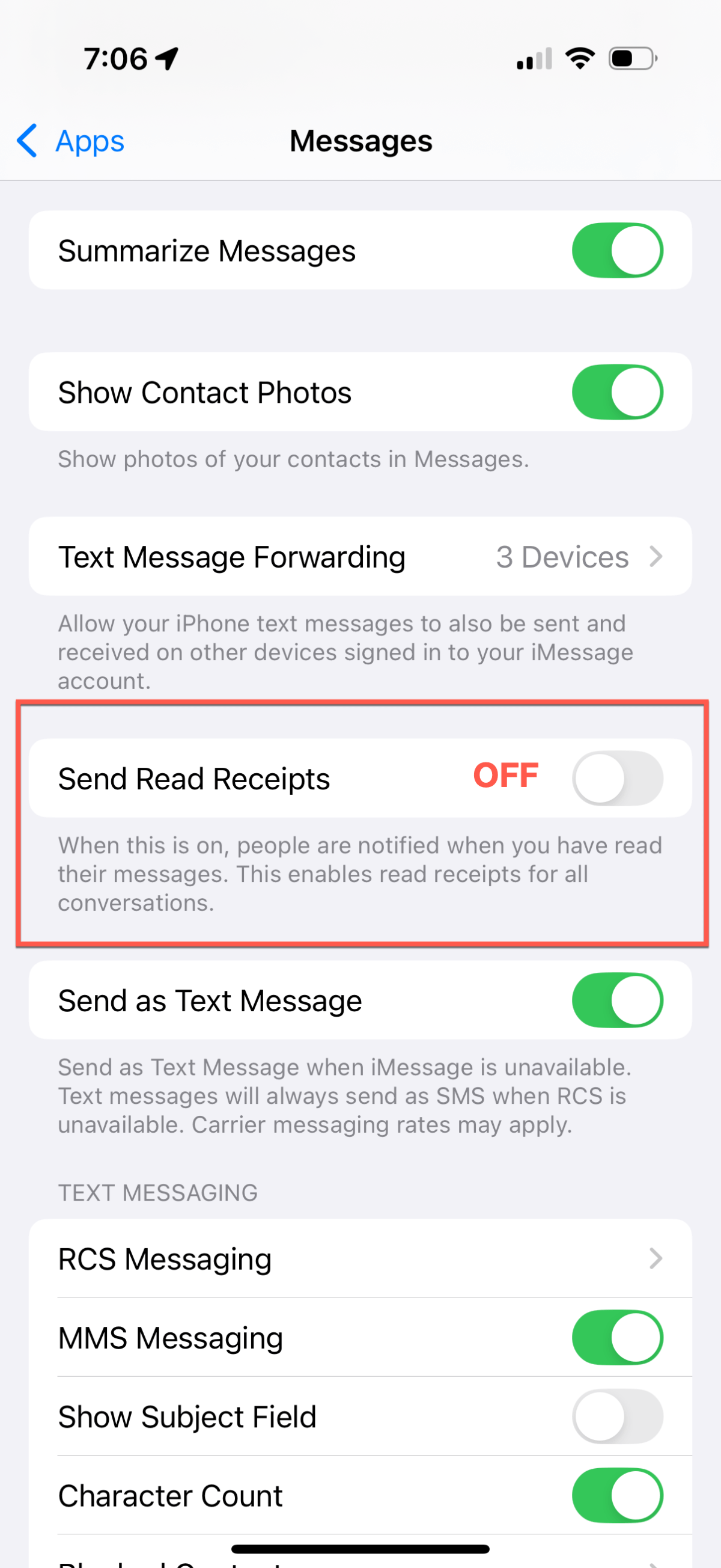
First, change the default settings – under Settings > Apps > Messages – make sure Send Read Receipts is set to OFF.
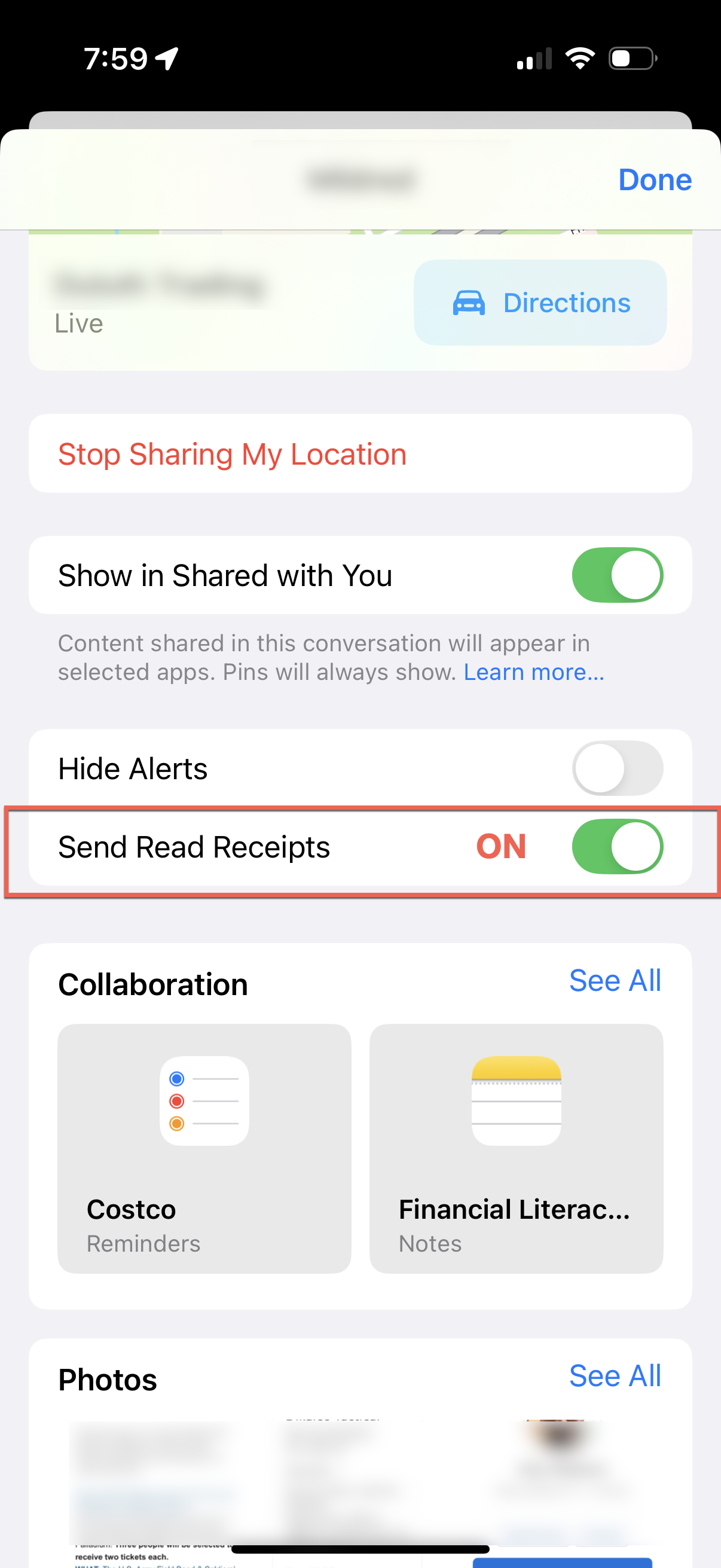
To enable sending read receipts to a single person, go to Messages, open the thread for the person you want to enable, and top on their avatar/image/contact photo. Scroll down, and you’ll see the option to Send Read Receipts for that one person.
Go forth, text, and (selectively) send receipts. Safely.
I was having a conversation about security basics with my wife; we touched on a lot of topics pretty quickly – phone settings, app settings, ways to protect accounts, and just general security hygiene. “You should write about some of these things”, she says – and I think she was right.
I’ve got 3-4 ideas drafted, for posting across the next few weeks. The plan is to deliver small bits, one topic at a time, making them shorter and quicker reads. I’ll be cross posting them between the Bridegroom Technologies and Beyond the Defaults sites, I think they work in both places.
To give you quick taste of things, I’ll offer some quick thoughts on news that broke today – the Chapter 11 Bankruptcy filing of 23andMe (the DNA testing company).
The quick thought: if you have information/data there about you, or have submitted things to them, start the deletion process. Now.
Chapter 11 is protection from creditors (versus a Chapter 7 liquidation) – but that doesn’t change the urgency here. One of the founders is trying to purchase the company and its assets (key point: all of the collected DNA results here are one of main assets of the company). However, she’s already been rebuffed once, and there’s no guarantee those assets won’t be sold to someone else to recover value for its investors and creditors as a part of the reorganization plan.
Since these are the days of doomsday thinking – can you imagine what a treasure trove of DNA data would be worth to someone like, say, some of the big tech names we read in the news almost every day? It’s all about data, especially when we consider things like training AI models. Scenarios like that make me and a lot of other people concerned about privacy and ethics lose sleep.
So 23andMe customers – protect yourself, act now, start deleting. While you’re at it, look at the privacy policies of other companies that have your personal data. Some jurisdictions (like California) have stiff privacy laws, but whether or not that covers companies that endure financial distress is up for debate. Yes, they’re boring to read, but this is why you should.
I hope you find these helpful and interesting. If you do, be sure to check back or subscribe to the site for future posts.
I ingest a lot of information, but it’s not always something that I read. There’s simply not enough “sit down” time to read all the things I want to read (unfortunate, but true). The good news is those portable technology things we tote around these days have this wonderful app called Podcasts.
I’ve always been a fan of radio, hooked at a young age on things like the Dr. Demento Show. The problem with catching the show was finding a radio station within reach that carried the show (very scarce in central Indiana), and hoping it was broadcast in a two-hour window that allowed me to listen.
Growing up in Chicago radio-space, it was Sunday 10:00 PM to midnight on WLUP for as long as could remember. Yes, Monday’s sucked more than normal, but always worth it.
I tell that story because having someting like a podcast would have been the ultimate answer. Think of a favorite a favorite radio show on a topic that’s interesting to you, except you can download it and listen to it when it’s convenient to do so. That could be cleaning the house, cutting the grass, driving to and from work, on a flight, digging in the garden, or any place where listening is possible but watching/reading may not be.
Streaming has changed the way people watch shows – they originate from a lot of different services, and we wait for the “drop” day and plan viewing schedules accordingly. Sometimes there’s a binge watching event, to catch up. Podcasts have done all this, and have been doing it for a long time. Once the the first portable audio players reached a critical mass in the early 2000’s, they started to appear. They didn’t need mobile bandwidth to play them, and the files were small enough that they could take advantage of much lower network speeds than we enjoy today.
Where to find them
The question of where to find them is probably best answered by pointing you to where you listen to your music and other audio content. First, though, you need an app on your device to consume/subscribe to them. Take your pick from any of these:
Apple Podcasts
Google Podcasts
Pocket Casts (3rd party app)
Downcast (3rd party app)
Overcast (3rd party app)
Spotify (exclusive content available)
Audible (exclusive content available)
iHeart Music
I’m sure I’ve missed a few, but any of these will get you on your way to listening.
The content options
There are podcasts for everything. Popular genres today include “true crime”/unsolved crimes/unsolved mysteries – and the conspiracies that grow from them. Of course there are political shows, news & opinion (some even local), sports, technology shows for the nerds, comedy, interview shows, and a ton of personal development options.
You know what you call a former network anchor/talk show host? A podcaster. People like Chris Wallace, Don Lemon, Katie Couric, Oprah Winfrey – all with very successful podcast operations. A lot of current broadcasters maintain podcasts – a platform to go deeper on topics, or be able to say things that might not fly in their day jobs.
If you’ve ever questioned their popularity and growth, we need only look at the election season last November. The ratings comparison of candidate news interviews versus podcast appearances is not even close. This image from Scott Galloway’s No Mercy/No Malice newsletter quickly paints the picture:
My point here is not to debate politics, but rather to illustrate what podcasting is doing to the media landscape. It is eating it alive, and it’s not going to stop soon. It doesn’t take a lot of money to produce a basic one – less than $1,000 in equipment, a computer, and an internet connection. The large, successful ones have full-blown studios, but most of them are in a host’s home delivered over the internet. Good cameras and microphones are not outrageously priced (I spent less than $300 for a good combination), and fiber optic connections to the house are getting to be normal.
A lot of podcast networks (like Spotify, Audible and iHeart) have paid some crazy contract money to hosts – a few have been successful, but there have been more flamouts than successes. Most are either advertiser or subscriber supported – because network and storage still costs money. All of this means that opportunities for smaller podcasters with great content (because it’s all about the content) are getting tougher, but it’s still there.
I’ve toyed with the idea off and on; I may still try it as a free offering, this site’s hosting service supports a way to store and deliver it. I’m still thinking about it.
What podcasts do for me
Other than saving me time and filling otherwise “dead hours” with meaningful content, I think I can break dow what I gain from listening to different shows into three categories:
Inform and educate – I like to hear from experts, or listen to an in-depth interview with someone of note or interesting in some way. In some cases, it’s to listen to viewpoints other than the ones I might have. It just makes me a more rounded person
Consolidation of information – news and interview shows can sometimes boil down the content from dozens of posts/pages/sites into an hour or so.
Entertainment – some people are just plain funny and enjoyable to listen to. It makes the drive home more enjoyable, allowing me to wind down and transition from my work brain to my home brain.
I don’t listen to every episode of every show – there are some I bail out after only a few minutes, and some show descriptions are just not appealing. Others I might listen to more than once. I might take a break from one or two for a while. I like the flexibility of choosing my listen.
As for a Dr. Demento podcast? I asked them about it, and licensing of the music would be unmanageable for them. Unfortunate for me, but understandable. I can subscribe to the site and listen online, but it means making sure I’ve got a network of some kind to listen to the stream. But I can dream…
If you enjoy reading this site, we can send new content to you when it’s published. Just provide your email below (with a 100% promise to do nothing else with it) and the website fairies will ship it directly to your inbox.


 Beyond The Defaults