Apple One

About a 4-minute read

A few years ago, I found myself at the digital crossroads – to stream or not to stream. I was tired of paying Comcast crazy amounts of money for both internet services and television services. I was also trying to decide what to do for a music service. While I have a lot of CD titles that are converted to digital (which is what I mostly listen to), there were a lot of gaps I wanted to fill. We had Amazon Echo devices that would play music, but without a premium subscription the catalog was very limited.

We’ve since solved the internet, television and music riddles with new services; my music solution came as a surprise, though “running the numbers” made the decision easier than expected. An Apple One Premier subscription made the most sense for us as a family. It might for you as well.

The Choices

I only looked at the unlimited (read: paid) solutions, for three reasons:

  1. The free catalogs are limited.
  2. I hate ads in the middle of my music, especially if I’m paying for it.
  3. A family plan was a must, as I’m not the only music consumer in my household.

The fact that I could take advantage of curated playlists was an added bonus (and I’ve really enjoyed discovering new things by way of the playlists).

It came down to Apple, Spotify, Pandora, and Amazon.

The Decision

I considered what other Apple services I was already using, and services that I previously considered but held off because the cost didn’t make any sense.

As a family, we’re fully invested in the Apple ecosystem (a topic for another post). That means all kinds of fruited devices – MacBooks, iPads, iPhones, and AppleTV. I was already paying for additional iCloud storage, because backups are important. iPhone and iPad devices have built-in backup solutions that run in the background – provided there’s enough space to park the backups. That meant $10/month to maintain that space; although it’s used for a lot of other things, its primary purpose is to make sure we don’t lose things (after learning that lesson the hard way with some photos).

Here’s the current pricing from Apple’s site – breaking down the individual service prices, the different purchasing levels, and the savings generated by bundling:
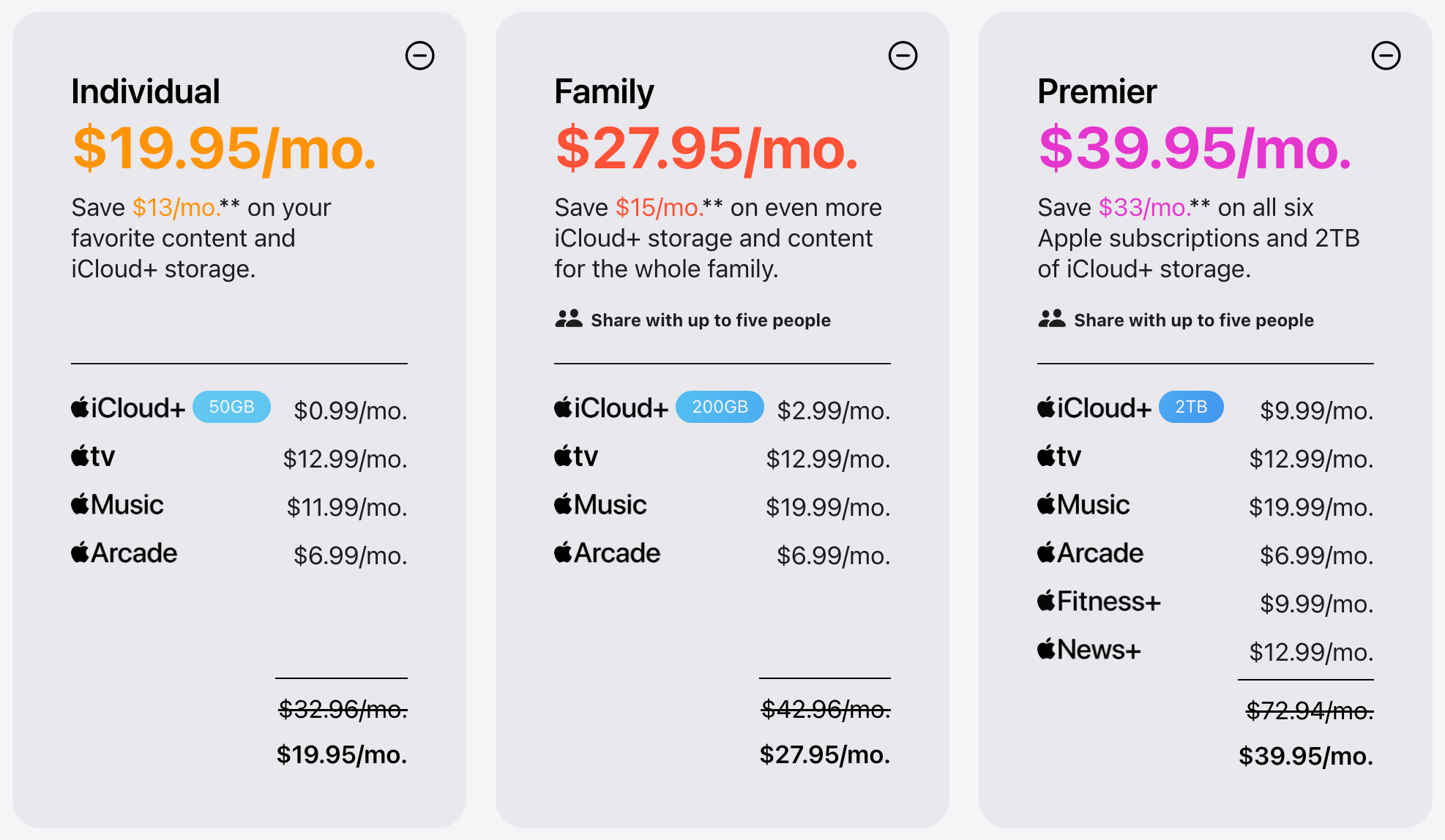
For iCloud storage and music by itself: $30/month. Family Plan: $28/month, and get tv+ and Arcade (although nobody is using it) thrown in. It already starts to make some sense.

Here’s how it stacks up to the other services:

As a standalone offering, Apple Music is competitively priced; once combined with other services, it’s very competitively priced.

Which made me start to look at what Premier offered – and what other costs that could potentially offset. In particular, I was looking at Apple News+.

It’s no secret that a lot of reading happens here, which means there are some subscription costs involved. There are some other publications I’d love to be able to read, but it’s simply not in the budget. Apple News+ solves for that, while saving me some significant money.

Making the switch to News+ has allowed us to drop subscription costs for:

  • The Washington Post
  • IndyStar
  • Time Magazine
  • Food Network
  • Consumer Reports

And for no additional costs, as a family we can now read:

  • Business publications (including Bloomberg Businessweek, Fast Company, and Business Insider)
  • Wired
  • National Geographic
  • The Atlantic
  • Wall St Journal
  • Bicycling Magazine
  • Rolling Stone
  • Sports Illustrated
  • Several home & garden and food related publications
  • Several hobby-related publications (including gaming, woodworking, music, and photography)
  • Dozens of newspapers (including many hometown papers of serveral BTD readers)

It’s like having a full magazine rack in front of us – complete with search – whenever we are looking for something new to read.

Jumping to Premier also opens up Apple Fitness+, something I’m going to start exploring as I step up my exercise in the coming weeks.

For us, this was an easy call. If it looks interesting to you, there’s a “try it free” option to kick the tires.

If you found this helpful and would be interested in our streaming TV decision process, drop a note and let us know.

Trades and AI – worth the watch or listen

Every now and then in my podcast travels, I find an episode that really registers with me and I start sending share links to people. It’s one of the great things about them, it’s easy to spread the word when it’s truly worth spreading.

In the last two weeks, there have been two, from different podcasters. I’ll share them here as well. Both are about an hour long.

First up – It’s only the Best School in America – from The Way I Heard It with Mike Rowe

Mike chats with Dr. Sheree Utash, Ed.D., president of WSU Tech and a national leader in workforce education. They talk about how she reinvented a community college into a national model for workforce development, her role in taking Mike’s S.W.E.A.T. Pledge and shaping it into the mikeroweWORKS curriculum, and why she believes skilled trades are key to America’s future. It’s a perfect pre-Labor Day discussion.

I’ve long been an advocate for those wanting to go into skilled trades. The country needs them, as many are now retiring out at a rate far greater than those going to those professions. My generation did a terrible disservice to kids, pounding the message that higher education was the path to success. We made it sound like it was the only path, and in the process pulled industrial arts out of schools. There are many paths to success, and they don’t all involve a degree. We’re all paying the price for that poor guidance today.

Here’s the Apple Podcasts Link, or watch it below on YouTube.

Next up – The AI Dilemma — with Tristan Harris from The Prof G Podcast

Tristan Harris, former Google design ethicist and co-founder of the Center for Humane Technology, joins Scott Galloway to explain why children have become the front line of the AI crisis.  They unpack the rise of AI companions, the collapse of teen mental health, the coming job shock, and how the U.S. and China are racing toward artificial general intelligence. Harris makes the case for age-gating, liability laws, and a global reset before intelligence becomes the most concentrated form of power in history.

I love listening to smart people talk about really challenging topics in a meaningful and constructive way. This was fascinating, educational, terrifying, and a few other words that I can’t articulate right now. If you have any interest in AI, you’ll find this very relevant.

 Here’s the Apple Podcasts link, and YouTube variety below

I hope you enjoy them as much as I did.

What to Do Before You Die: A Tech Checklist

Joanna Stern from the Wall Street Journal has been doing some interesting work lately, writing and interviewing about things we all need to talk about but never do.

What do we do with our digital lives when when our earthly lives are over?

There are some steps you can take now (like creating a digital will of accounts, designating additional “keepers” of accounts, taking inventory of what we have in the way of photos & video, etc).

I’ve got some work to do on this front – I’m in better shape than I thought, but still work to do. My guess is you have work to do as well.

Take a few minutes and check out her work if you can (it might be behind a paywall – it is worth a free article if you have one).

https://www.wsj.com/articles/what-to-do-before-you-die-a-tech-checklist-facebook-google-amazon-twitter-11608310486

What is Beyond The Defaults?

According to Dictionary.com:

The original settings. The standard setup. The way things were configured when it came out of the box. Vanilla. No changes. In technology, these are called the defaults. For most people, the defaults are enough.

Many moons ago, my friend Abby and I set out to make our non-work lives easier by starting up this little site called Beyond The Defaults. There are a million resources available to research just about anything – and that’s a pretty overwhelming endeavor when all you want to do is understand why a laptop might be a better option versus a tablet computer. For technical people (like us), we know how to wade through swamp, finding the nuggets that are useful. That’s why all of our friends and family start their phone calls with “hey, I’ve got a computer question for you”.

There are a lot more people like our friends and family than there are technical people like us, and those friends and family types simply don’t know what they don’t know. Even though things have advanced in big ways and people are a lot more technically savvy than they were nine years ago when we started, there’s still plenty to talk about.

I know that I’m doing a lot of things now that I wasn’t doing nine years ago, so I’m sure I’m not alone. Let’s reboot this thing and see what happens.

The objective hasn’t changed since 2011 – to show you the simple stuff that can make technology your friend, save you time and get the most out of all that money invested in technology. Some posts might very short – maybe just a quick note with a link to something useful. I’m hoping to also do a few longer things along the way as well. I hope you find some of it useful.